Sunday, 8 July 2018

COMPUTER NETWORK TOPOLOGY ( BUS, RING, STAR, MESH, TREE, HYBRID )

NETWORK TOPOLOGY

It is the schematic description of a network arrangement connecting various nodes ( Sender or Reciever ) through lines of connection.

Types of Topology.

  1. Bus Topology.
  2. Ring Topology.
  3. Star Topology.
  4. Mesh Topology.
  5. Tree Topology.
  6. Hybrid Topology.

BUS TOPOLOGY
It is a network type in which every computer and network device is connected to single cable. When it has exactly two ends points, It is called linear Bus topology.


Features.

  • It transmits data in only one direction.
  • Every device is connected to a single cable.

Advantages.

  • Cost effective, 
  • Used in small networks.
  • Easy to Understand.
  • Easy to expand joining two cables together 
  • Cable required is least compared to other network topology.

Disadvantages.

  • Cables fails then whole network fails.
  • Cable has a limited length.
  • Slower than the Ring topology and other topologies.


RING TOPOLOGY
It is called Ring topology because it forms a ring as each connected to another computer with the last one connected to the first.


Features.

  • A number of repeaters are used for ring topology with large number of nodes because if someone wants to send some data to last node in the 100 topology with 100 nodes. Then the data will have pass through 99 node to reach the 100 node. Hence to prevent data loss repeaters are used in the networks.
  • The transmission is unidirectional, but it can be made bidirectional by having 2 connections between each network node.
  • Data is transferred in a sequential manner that is bit by bit. Data transmitted has to pass through each node of the network till the destination node.

Advantages.

  • Transmitting network is not affected by high traffic or by adding more nodes as only the nodes having tokens can transmit data.
  • Cheap to install and expand.

Disadvantages.

  • Troubleshooting is difficult in Ring topology.
  • Failure of the computer disturbs the whole network.


STAR TOPOLOGY
In this topology all the computers are connected to a single hub through a cable. This hub is the central node and all other nodes are connected to the central node. 

Features..
  • Every node has its own dedicated to the hub.
  • Hub acts as a repeater for data flows.
  • Can be used with twisted pair, Optical fibre or Coxial cable.


Advantages.
  • Fast performance with few nodes and low network traffic.
  • Hub can be upgraded easily.
  • Easy to troubleshoot. 
  • Easy to setup and modify.
  • Only that node is affected which has failed, rest of the node can work smoothly.


Disadvantages.
  • Cost of installation is high.
  • Expensive to use.
  • If the hub failed then the whole network is stopped because all the node depend on the hub.
  • Performance is based on the hub that is depend on its capacity.


MESH TOPOLOGY
It is point to point connection to other nodes or devices.All the network nodes connected to each other. Mesh has  n(n-1)/2  physically channels to link n device.

Features.
  • Full connected.
  • Robust.
  • Not flexible.


There are two techniques to transmit data.
  1. Routing. 
  2. Flooding.


Advantages..
  • Each connection can carry its own data load.
  • It is robust.
  • Fault is diagnosed easily.
  • Provides security and privacy.


Disadvantages..
  • Installation and Configuration is high.
  • Cabling cost is more.
  • Bulk wiring is required.


TREE TOPOLOGY
It has a root node and all other nodes connected to its forming hierarchy. It is also called hierarchical topology. It should have least three levels to the hierarchy.

Features..
  • Ideal if workstations are work in groups.
  • Used in Wide Area Network.


Advantages.
  • Extension of star and bus topology.
  • Extension of nodes is possible and easy.
  • Easily managed and maintained.
  • Error detection is easily done.


Disadvantages.
  • Heavily cabled , due to this it is more costly.
  • If more nodes are added maintenance s difficult.
  • Central hub fails, network fails.

HYBRID TOPOLOGY
It is a two different types of topologies, which is a mix of two or more topologies.

Features.
  • It is a combination of two or more topologies.
  • Inherits the advantages and disadvantages.


Advantages..
  • Reliable as error detecting and troubleshooting is easy.
  • Scalable as size can  be increased easily.
  • Flexible.


Disadvantages..
  • Complex in Design.
  • Costly.


https://chat.whatsapp.com/LQwOhM1jvx25uNG5LXxU2f
If you are interested in this and want to learn more about Internet Networking Programming language and technologies then join my whatsapp group by this link.

  
we buy cars for cash cash for car cash for cars cash cars we buy junk cars buy junk cars sell my junk car near me sell my car for cash sell car for cash sell my car for cash today cash 4 cars we buy cars for cash Car Removals Sydney https://unwantedcarremovalsydney.com.au Cash for Scrap Cars Service Unwanted Car removals Car Removal Sydney Car Removal Car Removals Car Removals Sydney Car Removals Sydney

PROGRAMMING LANGUAGE PHYTON

PROGRAMMING LANGUAGE ( PHYTON )


Phyton is a popular programming language. It was created in 1991 by guido van Rossum.
  It is used for: 
  •  Web Development 
  • software Development 
  • Mathematics
  • System scripting
What Can Phyton Do ?.
  • Phyton can be used on server to create web applications.
  • Phyton can be used alonside software to create workflows.
  • Phyton can connect to database systems. It can also read and modify files.
  • Phyton can be used to handle big data and perform complex ,mathematics.
  • Phyton can be used for rapid prototyping, or for production ready software development.
Why Phyton we Used ?
  • Phyton works on different platforms ( Wndows, Mac, Linux, Raspberry Pi, etc ).
  • Phyton has a simple syntax similar to the English language.
  • Phyton has syntax that allows developers to write programs with fewer lines than some other programming languages.
  • Phyton runs on a interpreter system, meaning that code can be executed as soon it is written. This means that prototyping can be very quick.
  • Phyton can be treated iin  a procedural way, an Object Oriented way, or a functional way.
( Want to know more about Programming language )

GOOD TO KNOW ABOUT PHYTON..
  • The most recent  major version of phyton is Phyton 3, However, phyton 2 although not being updated with anything other than secuirity updates. 

PHYTON Syntax..
  • Phyton was designed for readability and has some similarities to the English language with influence from mathematics.
  • Phyton uses new lines to complete a command, as oppposed to the other programming languages which often use semicolons or parantheses.
  • phyton relies on indentation, using whitespace, to define space, such as the scope of loops, functions and classes.

Phyton Variables.

Unlike Other Programming languages, Phyton has no command for declaring a variable.
A variable is created the moment  you first assign a value to it. 

Example       x = 5;
                     y = "john"
                     print(x)
                     print(y)

Variables Names..
  • A variable name must start with a letter or the underscore character.
  • A variable name cannot start with a number.
  • A variable name can only contain alpha numeric, characters and undescores.
  • Variables names are case sensitive ( all, All, and ALL are different ).


Phyton Numbers 

There are three numeric types in phyton:
  • int 
  • float
  • complex

variables of numeric types are created when you assign a value to them:

       x = 1       #int
       y = 4.7    #float
       z = 2j      #complex

INT

Int or integer is a whole number, posotive or negative, without decimals of unlimited length.

Example     x = 1
                   y = 23.56
                   z = -23456

                  print(x)
                  print(y)
                  print(z)

FLOAT

Float or "floating point number" is a number positive or negative, containing one or more decimals.

Example     x = 3.6
                   y = 1.5.6
                   z = -34.25

                  print(x)
                  print(y)
                  print(z)

COMPLEX

Complex number are written with a "j" as the imaginary part:

Example   x = 3+2j
                 y = 4j
                 z = -3j

                print(x)
                print(y)
                print(z)


If you are interested in this and want to learn more about Internet Netwoking Programming Language and Technologies then join my whatsapp group by this link.. 
we buy cars for cash cash for car cash for cars cash cars we buy junk cars buy junk cars sell my junk car near me sell my car for cash sell car for cash sell my car for cash today cash 4 cars we buy cars for cash Car Removals Sydney https://unwantedcarremovalsydney.com.au Cash for Scrap Cars Service Unwanted Car removals Car Removal Sydney Car Removal Car Removals Car Removals Sydney Car Removals Sydney

Saturday, 7 July 2018

PROGRAMMING LANGUAGE JAVA BASIC OPERATORS

JAVA BASIC OPERATORS
Java provides a rich set of operators to manipulate variables. We can divide all the Java operators into the following categories.

  1.   Arithmetic operators.
  2.   Relational operators
  3.   Bitwise operators.
  4.   Logical operators.
  5.   Assignment operators.
  6.   Misc operators.
http://technolgydrift.blogspot.com/2018/07/programming-language-java-about-java.html
( WAnt to know About Basic of JAVA click on this link ).

http://technolgydrift.blogspot.com/2018/07/difference-betwen-java-snd-javascript.html
( Want to know about difference between java and javascript  click on this link ).


1. The Arithmetic Operators.

Arithmetic operators are used in mathematical expressions in the same way that they are used in algebra.

Assume integer variable A holds 10 and variable B holds 20 , then..

2. Relational Operators.

There are following relational operators supported by java language.

Assume variable A holds 10, and variable B holds 20, then..


3. Bitwise Operators.

Java defines several bitwise operators, which can be applied to the integer types, long,  int, short, char, and byte..
Bitwise operators works on bit and performs bit by bit operation. Assume if A = 60 and B = 13, now in binary format they will be as follows .

 A = 0011 1100
B = 0000 1101

A&B = 0000 1100

A|B = 0011 1101

A^B = 0011 0001

!A = 1100 0011

Assume integer variable A holds 60 and variable B holds 13, then

4. Logical Operator.

Assume Boolean variables A holds true and variable B holds false, then

5. Assignment Operator.

Following are the assignment operators supported by java language.

1.   ( = )   Assigns value from right side operand  to left side operand.
                C = A+B  will assigns value of A+B into C.

2. ( += )  ADD AND assignment operator. Its ADD right operand to the left operand and assign  the                    result to left operand.
               C+=A equal to C = C+A .

3. ( -= ) Subtract AND assignment operator. Its subtract right operand from the left operand and                       assign result to the left operand.
            C-=A equal to C=C-A

4.  ( *= ) Multiply AND assignment operator. It multiplies right operand with the left and assign the                   result with the left operand.
               C*=A equal to C=C*A

5. ( /= )  Divide AND assignment operator. It divides right operand with the left and assign the                          result with the left operand.
               C/=A equal to C=C/A

6.  ( %= )  Modulos AND assignment operator. It divides right operand with the left and assign the                       result with the left operand.
                 C%=A equal to C=C%A
7. ( <<= ) Left Shift AND assignment operator
                C<<=2 is same as C = C<<2

8. ( >>= ) Right Shift AND assignment operator
                C>>=2 is same as C = C>>2


Misc Operator.

Conditional operator
Conditional operator is also known as ternary operator. This operator consists of three operand and is used to evaluate boolean expressions. The goal of the operator  is to decide,  which value should be assigned to the variable..


https://chat.whatsapp.com/LQwOhM1jvx25uNG5LXxU2f
If you are interested in this and want to learn more about Internet Networking Programming language and Technologies then join my whatsapp group by this link.

we buy cars for cash cash for car cash for cars cash cars we buy junk cars buy junk cars sell my junk car near me sell my car for cash sell car for cash sell my car for cash today cash 4 cars we buy cars for cash Car Removals Sydney https://unwantedcarremovalsydney.com.au Cash for Scrap Cars Service Unwanted Car removals Car Removal Sydney Car Removal Car Removals Car Removals Sydney Car Removals Sydney

Friday, 6 July 2018

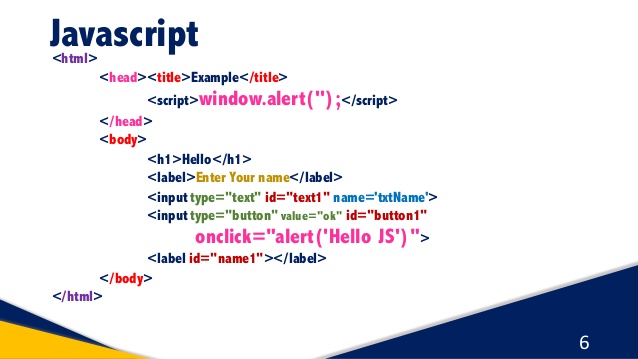
DIFFERENCE BETWEEN JAVA AND JAVASCRIPT.

DIFFERENCE BETWEEN JAVA AND JAVASCRIPT
Key difference betweeen java and javascript.

  • JAVA is an  OOP programming languagae while JAVASCRIPT is a OOP scripting language. JAVA creates applications that run in a virtual machine or browser. while JAVASCRIPT code is run on a browser only. JAVA code needs to be compiled while JAVASCRIPT code are all in text.
  • JAVA is a statically types language while JAVASCRIPT is a weakly typed language.
  • Both the languages are interpreted languages ( unlike c, which is compiled to machine code as per the machine on which they run).
  • JAVASCRIPTS supports prototype based objects system, while JAVA is normally typed object system.
  • Java has a well developed "package " system, while  javascript package are not predefined. this has impact on sharing and reusing code.
  • Both the languages support the fundamental requirements of Object Oriented Programming like Encapsulation, Inheritence, Abstraction and Polymorphism. But one being a "statically"  typed and the other "dynamic" the style and rigor of achieving these are different.
  • Both the language support certain aspects of functional programming the recursion, high order function, first class functions . 
  • Java has a bigger set of basic data structure (different kinds of maps, lists, Sets ) in built into the language compared to javascript. This might have an impact if we want to implement certain algorithm or optimizations.
  • Both the languages are virtual machine based, Unlike C or C++ , in which we submit the program directly to the underlying OS to run, in Javascript and java , we submit the program to the virtual machine to run. the virtual machine is responsible for managing the memory of the program, performing inline optimizations, security of the running programs etc. 

Some Major Differences..

Compiled vs. Interpreted 
                      Java is considered a compiled  programming language. javascript is considered as                                interreted scripting language. The difference is in the implementation. Java is compiled                        into byte code and run on a virtual machine. whereas javascript can  be interpreted                                directly by a browser in the syntax it is written.

Static vs Dynamic Type Checkin
  Java uses static type checking where the type of a variable is checked at compile time.                          The programmer must specify the type ( integer, string, double etc) of any variable they                        create . Javascript, like most scripting language, use dynamic type, where type satisfy                          isverified at run time. It is not required for a programmer to specify the type of any                              variable they create. There are many pros and cons for these two paradigms, but the                              primary advantage of static type checking is that type errors are caught in early                                    development and compiler knows exactly what data type are being used, code typically                        execute faster or uses less memory. The primary advantage of dynamic type checking                           isprogrammer productivity you are free to assign types at your leisure.


Class Based vs Prototype Based.
                      Java follows class based inheritence a top down, hierarichal, class based relationship                            whereby properties are defined in a class and inherited by an instance of that class. In                           Javascript, inheritence is prototypal -all objects can inherits directly from other                                   objects. Hierarchy is accomplished in Javascript by assigning an object as a prototype                            with a constructor function.
 

https://chat.whatsapp.com/LQwOhM1jvx25uNG5LXxU2f
If you are interested in this and want to learn more about Internet Networking Programming language and Technologies then join my whatsapp group by this link.
we buy cars for cash cash for car cash for cars cash cars we buy junk cars buy junk cars sell my junk car near me sell my car for cash sell car for cash sell my car for cash today cash 4 cars we buy cars for cash Car Removals Sydney https://unwantedcarremovalsydney.com.au Cash for Scrap Cars Service Unwanted Car removals Car Removal Sydney Car Removal Car Removals Car Removals Sydney Car Removals Sydney

Thursday, 5 July 2018

PROGRAMMING LANGUAGE JAVA


PROGRAMMING LANGUAGE (JAVA)

About  JAVA ..
  • Java is a case sensitive language.
  • Java is nearly 100% object oriented language.
  • In JAVA, it is not possible to make a function which is not a member of any class.

HISTORY of JAVA
  • Java was developed by james Gosling  at Sun Microsystem, inc.
  • Java originated at Sun Microsystems, inc.in 1991.
  • Vinod Khosla was the Co-founder of Sun Microsystems.

Importance of JAVA.
  • Java resides in obiles, client machines, server machines, embedded devices, smart phones, cloud etc.
  • It shares the same basic features of the language and libraries.
  • Principal of JAVA : Write Once, Run Anywhere(WORA).
What is Library 
  • Java library is as collection of predefined classes.
  • You can use these classes either by inheriting them or by instanting them. 
JAVA Flavours (Types)
  1. JAVA SE ( core java)
  2. JAVA EE ( Advanced java)
  3. JAVA ME (Micro edition for mobiles)
FEATURES OF JAVA
  • Simple.
  • Object Oriented Language.
  • Distributed.
  • Interpreted.
  • Robust.
  • Secure.
  • Portable.
  • Multi-threaded.
  • Garbage Collector.
Data Tpyes..
  • A type identifies a set of value(and their representation in memory) and a set of operations that perform these values into other values of that set.
  • JAVA is stronglt typed language.
PRIMITIVE TYPE Data Type
These are the Data Types of java programming.
 In this each data type has own meaning such as 
  1. boolean       Its just check statement is true or false.
  2. char             Its use for single characters ( 'A').
  3. short            Its use to store for real numbers in only 2 btye. ( 1 byte = 8 bits)
  4. int                Its also use for store to real number in 4 bytes. 
  5. long             Its also use for store to real number in 8 bytes.
  6. float             Its use to store decimal (floating number such as 4.8, 3.5) values in 4 bytes. 
  7. double         Its used for store both real and decimal number in 8 bytes.
Examples:
  •  int x;
  • double temp;
  • string name;
  • int [] ages;
  • char letters[];
CONSTANTS
  • integer constants consists of a sequence of digits.
  • If the constants is to represent a long integer value, it must be suffixed with an uppercase L or lowercase l.
  • If there is no suffix the constant represent 32 3bit integer (an int).
  • Integer constants can be specified in the decimal , hexadecimal, octal, or binary format.
               127           ( deciaml number )
               0x7f          ( hexadecimal ) there is 0x is just a sign to show hexadeciaml number and f = 15 
               0122          ( octal )  there is 0 is just to show octal number 
              0b01010110       ( binary ) there is 0b is just to show that it is in binary. and binary number is                                                 always written in 0 and 1 .  

CONVERSION  IN JAVA
  • Every expression written in the java programming language has a type that can b decuded from the structre of the expression and the types of the literals, variables, and methods mentioned in the expression.
Permitted Conversions 
  • byte to short, int, long, float or double.
  • short to int, long , float or double.
  • char to int, long float or double.
  • int to long, float or double.
  • long to float or double.
  • float to double.
Example

https://chat.whatsapp.com/LQwOhM1jvx25uNG5LXxU2f
If you are interested in this and want to leanr more about Internet Networking Programming language and Technologies then join my whatsapp group by this link..


we buy cars for cash cash for car cash for cars cash cars we buy junk cars buy junk cars sell my junk car near me sell my car for cash sell car for cash sell my car for cash today cash 4 cars we buy cars for cash Car Removals Sydney https://unwantedcarremovalsydney.com.au Cash for Scrap Cars Service Unwanted Car removals Car Removal Sydney Car Removal Car Removals Car Removals Sydney Car Removals Sydney

Wednesday, 4 July 2018

WEB DEVELOPMENT SCRIPTING LANGUAGE PHP

WEB DEVELOPMENT (PHP)


About PHP.
  • PHP is a server side scripting language.
  • PHP is a powerful tool for making dynamic and interactive web pages.
  • PHP is a language for creating interactive web sites and is used on over 4 million web sites around the world.
  • PHP file can contain text,HTML tags and scripts.
  • PHP files are returned to the browser as plain HTML.
  • PHP files have a file extension of ".php" .
  • PHP can run on different platforms(Windows, Linux, Unix, etc).
  • PHP is compatible with almost all servers used today(Apache, IIS, etc).
Friends before read this i want you know about web development course and its languages such as HTML CSS Javascript. You find all these in these link after understand all these then learn about PHP  

Why PHP ?
  • Easy to Learn.
  • Best suited for rapid application development.
  • Easy to implement.
  • PHP community is a big support for the programmers
  • Runs on almost every platforms
  • It is free.

WAMP : Windows Apache MySQL PHP  (This is for windows It is a software that contain Apache MySQL and PHP it is a package of all these three.)
LAMP : Linux Apache MySQL PHP . (This is for Linux It is a software that contain Apache MySQL and PHP it is a package of all these three.)

PHP HISTORY
  • Earlier it was Personal Home Page.
  • Now a days it is PHP: Hypertext preprocessor.
  • It was created in 1994 byRasmus Lerdorf.
PHP Basic Syntax
  • PHP files have a file extension of ".php" .
  • PHP file may contain.
  1. HTML (Everything in HTML code in the file by default)
  2. CSS (code in style tag)
  3. Javascript(code in script tag)
  4. PHP  (code in <?php...?> ).
PHP Script
  • PHP script can be used any number of times in the php file.
  • Every piece of PHP in the page is enclosed in <?php...?>
PHP VARIABLES
  • Vaiables are used to store constants.
  • These constants could be strings, numbers, or arrays.
  • When a variable is declared,it can be used over and over again in your script.
  • All variables in PHP start with a $ sign symbol.
            Syntax.....       <?php   ( opening of PHP )
                                   $txt = "Computer";    ( variables that start with $ sign )
                                   $x = 4;
                                   ?>   (closing of PHP )
  • In PHP, the variables is declared automatically when you use it.
Name Rules 
  • A variable name must start with an alphabet or an underscore "_" .
  • A variable name can only contain alphanumeric characters and underscores (a-z, A-Z, 0-9, and _ )..
  • A variable name should not contain spaces.
  • In PHP, a variable does not need to be declared before adding a value to it.
  • PHP automatically converts the value to correct data type, depending on its value.
PHP has Four Different Variables Scopes.
  1. Local 
  2. Global
  3. Static
  4. Parameter

LOCAL SCOPE
  • Program will not generate any output.
  • The echo statement refers to the local scope variable $x
  • You can have local variables with the same name in different functions, because local variables are  only recognised by the function in which they are declared.
  • Local variables are deleted as soon as the function is completed.
GLOBAL SCOPE
  • A variabl that defined outside of any function,has a global scope.
  • To access a global scope variable from within a function, use the global keyword
  • PHP also stores global variables in an array called $GLOBAL[index]
  • The index holds the name of the variable.
  • This array is also accessible from within functions and can be used to update global variables directly.
STATIC SCOPE
  • When a function is completed, all of its variables are normally deleted.
  • Some times you want a local variable not to be deleted.
  • To do this, use the static keyword when you first declare the variable.
  • The variable is still local to the function.
  • Each time the function is called, that variable will still have the information it contained from the last time the function was called.
  • So the life og static variable is the php page.

PARAMETER SCOPE
  • A parameter is a local variable whose value is passed to the function by the calling code
  • Parameters are declared in a parameter list as part of the function declaration...

If you are interested in this and want to learn more about Internet Networking Programming Language and Technologies then join my whatsapp group by this link..


we buy cars for cash cash for car cash for cars cash cars we buy junk cars buy junk cars sell my junk car near me sell my car for cash sell car for cash sell my car for cash today cash 4 cars we buy cars for cash Car Removals Sydney https://unwantedcarremovalsydney.com.au Cash for Scrap Cars Service Unwanted Car removals Car Removal Sydney Car Removal Car Removals Car Removals Sydney Car Removals Sydney

Tuesday, 3 July 2018

WEB DEVELOPMENT LANGUAGE JAVASCRIPT

WEB DEVELOPMENT (JAVASCRIPT)


About JAVASCRIPT

  • Javacsript is a high level,un typed and interpreted programming language.
  • Despite some naming,syntatic and standard library similarities, javascript and java are otherwise unrelated.
  • javascripts statements are separated b semicolons.
  • Javascript statements are composed of : value, operators Expressions, Keywords, and Comments.
  • Javascript used in web pages to add functionality, validate forms, communicating with server and read write HTML elements.
  • Javascript is a client side scripting language.

HISTORY OF JAVASCRIPT
  • Javascript was created in 10days in May 1995 by Brendan Eich, then working at Netscape and now on Mozilla.
  • The original name of javascript was Mocha(name chosen by founder of Netscape).
  • In September 1995, name changed to Livescript .
  • Again in December 1995, name changed to Javascript.
JAVASCRIPT INTERPRETER
  • As a browser goes through the javascript,it passes it to a special program called interpreter which convert the javascript to the machine code your computer understands.
  • Browsers equipped with javascript Interpreters.

JAVASCRIPT in  HTML File.
  • Javascript code must be inserted between <script>and </script> tags.
  • Script can be placed anywhere in HTML document.(body or head).
  • <script type="text/javascript"></script>
  • The type attribute is not required. Javascript is the default scripting language in HTML.
Where to Write Code.
  • In the same HTML file
  • In a separate file, which can be embedded into HTML file.
In External File
  •  In External File script cannot contain the <script></script>  tags.

Where We Can Write JS.
  • In head tag.
  • In body tag.
  • In external file.
  • In JS function.
  • In events attribute value.
Javascript syntax........

  <html >     
    <head>
     <script>        (javascript <script> tag open)
      document.write("ROHIT");         (In javascript document.write is a statement we wite it to print                                                                      anything on screen  in this ROHIT is printed on screen)
    </script> (closing tag)
  </head>
  <body>
   <h1>Home Page</h1>
  <script>
   document.write("YADAV");
 </script>
   <p>This is a javascript page</p>
  </body>
</html>
http://technolgydrift.blogspot.com/2018/07/web-development-html-introduction-to.html


http://technolgydrift.blogspot.com/2018/06/web-development-web-development.html

Friends if you cannot understand about is so firstly you will be know HTML and CSS and in a WEB DEVELOPMENT cousre you will need to understand all of these languages. So firstly start from HTML, CSS and then Javascript.
And i will provide you my best..


Javascript Variables

  • Variables are used to store data values.
  • The var keyword is used to declare variables. 
  •        var x=5;
  • JS varaiables are containers for storing constants.
  • The keyword var is used to declare variables.
               Example     var x=4;
                                  var y=3.5;
                                  var z="Hello";
                                  var a=3+x;

Javascript Keywords
var is a keyword.
As of now there are 63 keywords in JS.


Friends javascript is a very easy and basic conceptual language and easy to learn.
and remain all topics of javascript is coming soon in next blog.

http://technolgydrift.blogspot.com/2018/07/web-development-php-about-php.html
( Want to know About PHP click on this link )

https://chat.whatsapp.com/LQwOhM1jvx25uNG5LXxU2f
If you are interested in this and want to learn more about Internet Networking Programming Language and Technologies then join my whatsapp group by click on this link.
we buy cars for cash cash for car cash for cars cash cars we buy junk cars buy junk cars sell my junk car near me sell my car for cash sell car for cash sell my car for cash today cash 4 cars we buy cars for cash Car Removals Sydney https://unwantedcarremovalsydney.com.au Cash for Scrap Cars Service Unwanted Car removals Car Removal Sydney Car Removal Car Removals Car Removals Sydney Car Removals Sydney

Sunday, 1 July 2018

WEB DEVELOPMENT LANGUAGE CSS


WEB DEVELOPMENT  (CSS)

What is CSS ?

  • CSS stands for Cascading Style Sheet.
  • CSS defines how HTML elements are to be displayed on screen, paper, or in other media 
  • CSS saves a lot of work. I tcan control the layout of multiple wep pages all at once.
  • External stylesheets are stored in CSS files.


Why Use CSS ?

  • CSS is used to define styles for your web pages ,including the design, layout and variation in display for different devices and screen sizes.


CSS solved  A Big Problem...

  • HTML was never intended to contain tags for formatiing a web page.
  • HTML was created to describe the content of a web page, like:
  • <h1> This is Heading</h1>
  • <p> This is a paragraph</p>

  • When tags like <font> and color attributes,were added to HTML it startes a nightmare for web developers> Development of large websites, where font and color ingormation were added tov every single page become a long and expensive pages.
  • To solve this problem, the World Wide Web Consortium(W3C) created CSS. 

Where To Write CSS ?
  • We can write CSS in a separate file and link it to our HTML file or embed CSS in HTML file itself.
  1. External Style Sheet
  2. Internal Style Sheet
  3. Inline Style

EXTERNAL STYLE SHEET..
  •     External style sheet means when CSS is written in a another CSS file linked to HTML file.
  • <style> tag must be used to write CSS in another CSS file.
  • Their is  specification of type (text/css).
Syntax..                                                                                             

(html file linkes to css file by stylesheet rel)                                          my.css (file)
  <html>                                                                                            body{
<head>                                                                                                      background-color: green;
<link rel= "stylesheet" type="text/css" href = "my.css">                          }
</head>                                                                                             h1{
<body>                                                                                                     background-color: red;
<h1>ROHIT</h1>                                                                                 }
</body>
</html>                                                                   ANS is     ROHIT


INTERNAL STYLE SHEET

  • Internal style sheet means when CSS is included in the same html file.
  • <style > tag must be used to write css in html file.
  • <stye> tag shoule be in <head> tag.
  • Type attribute of style tag specify the type of MIME type (text/css).
  • Internal style sheet is useful when page specific properties need to be applied.
  • Preference is given to Internal style sheet over External style sheet.
Syntax...
<html>
<head>
  <style>
    p{
       background-color: green;
      }
    body{
             background-color: red;
      }
  </style>
</head>
<body>
<p>ROHIT</p>
</body>
</html>

ANS is   ROHIT


INLINE STYLE SHEET
  • Style attribute can be used with tag representing html element
  • The value of style attribute is any CSS property
  • Example (<h1 style="color:green;text-decoration: underline;">This is Heading </h1>
  • Each property name-value pair is terminated with a semicolon.
  • Inline style has more preference given than Internal or External style.
  • Inine style is useful when element specific property need to be applied.

Syntax...
<html>
<head>
<style>
p{
background-color: yellow;
}
</style>
</head>
<body>
<p style="background-color: red;">HTML</p> 
</body>
</html>

ANS is  HTML
Background color is red because yellow color is in internal style sheet but red is in inline style sheet.
CSS representation
http://technolgydrift.blogspot.com/2018/07/web-development-javascript-about.html
( Want to know About Javascript  click on this link ).

https://chat.whatsapp.com/LQwOhM1jvx25uNG5LXxU2f
If you are interested in this and want to learn more about Internet networking Programing Language and Technologies then join my whatsapp group by this link.

we buy cars for cash cash for car cash for cars cash cars we buy junk cars buy junk cars sell my junk car near me sell my car for cash sell car for cash sell my car for cash today cash 4 cars we buy cars for cash Car Removals Sydney https://unwantedcarremovalsydney.com.au Cash for Scrap Cars Service Unwanted Car removals Car Removal Sydney Car Removal Car Removals Car Removals Sydney Car Removals Sydney

WEB DEVELOPMENT LANGUAGE HTML

WEB DEVELOPMENT  (HTML)


INTRODUCTION TO HTML
  • HTML is a markup language that web browsers  use to internet and compose text, images and other material into visual or audible web pages.
  • It is not a programming language.
  • HTML is case sensitive language.
  • HTML uses markup tags to define a web page.
  • HTML file has an extension .htm or .html .
  • HTML is developed by World wide web consortium.
ADVANTAGES..
  • No need of any programming language background.
  • You need a web browser installed on your machine and a text editor like note pad.
  • Web browsers are Internet explorer, Google chrome, Opera, Mozilla Firefox etc.
Where toWrite ?
  • You need to open notepad,open a new file and write html code in it.
  • Save it with html extension.
  • Execute it with some browser.
  • You can reopen HTML file with notepad to make any edition.
HTML TAGS

  Title tags
  •   It is written in <head> tag.
  • The <title> tag defines the title of the document.
  • It defines a title in the browser toolbar.
  • It provides a title for the page when it is added to favorites.
  • It displays a title for the page in search engine result.
Heading tags
  • Headings are defined with the <h1> and  <h6> tags
  • <h1> defines the most important heading.
  • <h6> defines the least important heading.
  • Search engines use your heading to index the structure and context of your web pages.
Paragraph tag
  • Paragraphs are defined with the <p> tag.
  • Browsers automatically added an  empty line before and after a paragraph.
Formatting tags
  • <br/> Break line.
  • <hr/> Horizontal line.

In this table you can see many type of tags with their starting and Ending .. these are used for a text to give a better look and use as when they required.

HTML Elements.
  • An HTML element is an endividual component of an HTML document.
  • It start with a start tag / opening tag and ends with an end tag / closing tag.
  • The element content is everything between the start and the end tag.
  • Most HTML element can have attributes.

http://technolgydrift.blogspot.com/2018/07/web-development-css-what-is-css-css.html
( Want to  know about CSS) click on this link.

https://chat.whatsapp.com/LQwOhM1jvx25uNG5LXxU2f
I f you are interested in this and want to learn more about Internet Networking Programming Language and Technologies then join my whatsapp group by click on this link.
we buy cars for cash cash for car cash for cars cash cars we buy junk cars buy junk cars sell my junk car near me sell my car for cash sell car for cash sell my car for cash today cash 4 cars we buy cars for cash Car Removals Sydney https://unwantedcarremovalsydney.com.au Cash for Scrap Cars Service Unwanted Car removals Car Removal Sydney Car Removal Car Removals Car Removals Sydney Car Removals Sydney

( DIGITAL INDIA ) DIGITAL NETWORKING SERVICE

DATA COMMUNICATION AND NETWORKING With the advancement of Data Communication facilities the communication between computers has increa...